Application Installation
My essentials
This is my essential checklist of applications for setting up a new development environment, including links to their official install sources.
Ubuntu
Create root password
passwdInstall From apt
sudo apt install build-essential
sudo apt install cmake
sudo apt install vim
sudo apt install emacs
sudo apt install nano
sudo apt install gedit
sudo apt install git
sudo apt install zsh
sudo apt install screen
sudo apt install curl
sudo apt install tmux
sudo apt install python3-pip
sudo apt install graphviz
Install From snap
sudo snap install discord sudo snap install kolourpaint
Install From App Center
- Steam
- Slack
- Visual Studio Code (“code”)
Install From .deb
From directory with .deb file
sudo dpkg -i <.deb file>Apps
DrawIO
Download .deb from here.
Run with
drawioIf you get this error
FATAL:setuid_sandbox_host.cc(163)] The SUID sandbox helper binary was found, but is not configured correctly. Rather than run without sandboxing I'm aborting now. You need to make sure that /opt/drawio/chrome-sandbox is owned by root and has mode 4755.Run this command
sudo chmod 4755 /opt/drawio/chrome-sandboxArduino CLI
Install Arduino CLI
Source: Arduino CLI
Create
~/local/if it doesn’t already exist:mkdir ~/localNavigate to
~/localand run command to installarduino-clicurl -fsSL https://raw.githubusercontent.com/arduino/arduino-cli/master/install.sh | shPre-pended
$PATHenvironment variable with this line in~/.bash_profileexport PATH=~/local/bin:$PATHSource
.bash_profilesource ~/.bash_profileVerify
arduino-cliwas installed> which arduino-cli /home/flux/local/bin/arduino-cliUpdate
arduino-cliarduino-cli upgradeSee the
Arduino CLIwiki page for information on configuration.
Calibre
This app is used to view and print .epub files.
sudo -v && wget -nv -O- https://download.calibre-ebook.com/linux-installer.sh | sudo sh /dev/stdinWindows
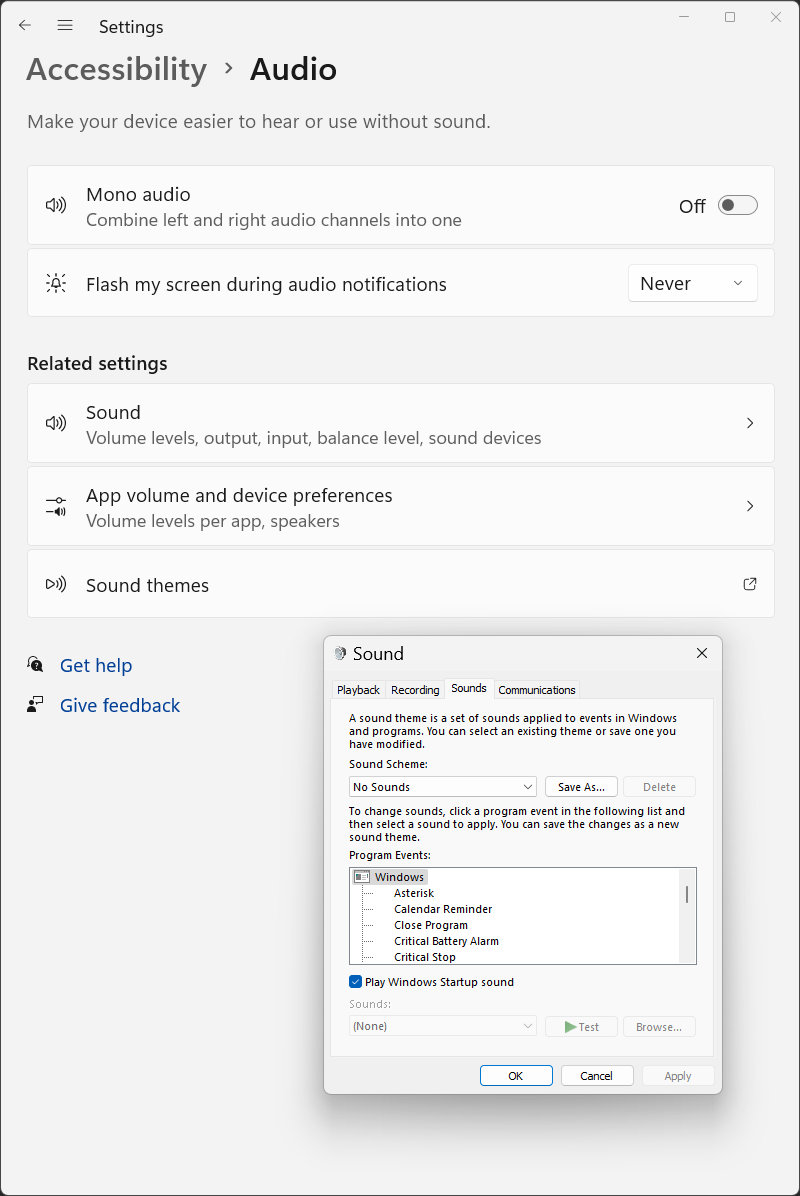
Turn off alert sounds
Windows makes an alert sound every time tab complete doesn’t work or other silly things. Turn it off in settings.
Go to Audio - change other sound settings
or
Sound > sound control panel > Sounds tab > Sound Scheme dropdown > No Sounds.
Cygwin
Download Cygwin and install packages
- lynx
- wget
- tar
- git
- vim
- dos2unix
Software Downloads
- Python
- Visual Studio Code
- Chrome
- Spotify
- Slack
- Steam