Color Scheme Exporter
Synchronize your development aesthetic.
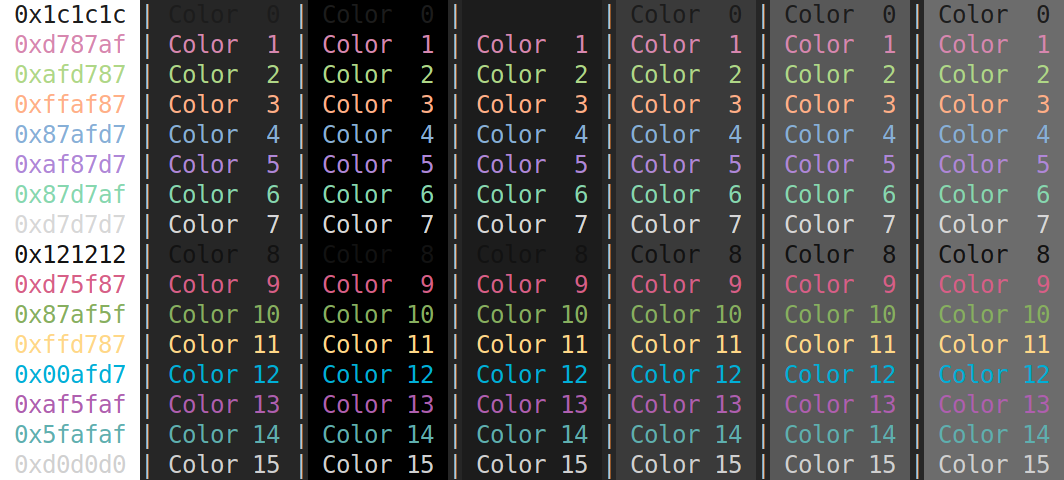
Color Scheme Exporter is a utility designed to synchronize your visual experience across various terminal and development environments. By defining a standard ANSI 16-color palette in a single JSON source, users can instantly generate color configuration files for various terminal emulators, including GNOME Terminal and Cygwin.
As a software engineer, I frequently find myself developing in numerous terminal environments and want to maintain a unified color experience. I built this tool to eliminate the manual effort of redundant configuration and ensure visual consistency no matter which terminal I’m using.
How It Works
Define your color scheme using a simple JSON configuration. Map your preferred RGB hex values to the background, foreground, and ANSI palette as shown below, omitting the comments:
{ "intense-bold"              : "false"
, "background-color"          : "0x262626"
, "background-color-intense"  : "0x303030"
, "foreground-color"          : "0xc6c6c6"
, "foreground-color-intense"  : "0xafafaf"
, "cursor-color"              : "0xff875f"
, "palette"                   :
  [ "0x1c1c1c" // Color  0: Black
  , "0xd787af" // Color  1: Red
  , "0xafd787" // Color  2: Green
  , "0xffaf87" // Color  3: Yellow
  , "0x87afd7" // Color  4: Blue
  , "0xaf87d7" // Color  5: Magenta
  , "0x87d7af" // Color  6: Cyan
  , "0xd7d7d7" // Color  7: White
  , "0x121212" // Color  8: Bright black
  , "0xd75f87" // Color  9: Bright red
  , "0x87af5f" // Color 10: Bright green
  , "0xffd787" // Color 11: Bright yellow
  , "0x00afd7" // Color 12: Bright blue
  , "0xaf5faf" // Color 13: Bright magenta
  , "0x5fafaf" // Color 14: Bright cyan
  , "0xd0d0d0" // Color 15: Bright white
  ]
}
Run the script using the required arguments. To view the most up-to-date options and usage instructions, use the help flag:
python color_scheme_exporter.py --helpExample command:
python color_scheme_exporter.py \
-f input-file.json              \
-n my-color-scheme              \
-o ~/.themes                    \
-s gnome
How To Use Output
This section describes how to use the output file(s) produced by this utility.
GNOME
Follow instructions here for how to invoke a GNOME color scheme.
Mintty / Cygwin
Save the output file as .minttyrc and save in your home directory.
VS Code Terminal
Copy the output and save to your settings.json file.